
Ansible Roles
Ansible roles are helpful in defining framework for vars_files, handlers and tasks with support of best-known file structure. Roles are grouped to allow easy sharing of roles with other users.This simplifies writing complex playbooks, and it makes them easier to reuse. A playbook can be splitted into reusable components.
Creating a New Role
ANSIBLE GALAXY
A Galaxy website is referred by ansible galaxy (community) for sharing roles and roles can be shared to command-line tool for installation, creation and management of roles. We can use Galaxy’s Search page to find Roles and Collections for your project, then follow the instructions to download them onto your Ansible host.The Ansible Galaxy program line tool comes full of Ansible, and it will be accustomed install roles from Galaxy or directly from a supply management Management system like Git”.
Role Structure
Roles have a quite structured layout on the file system. We can change the default structure but for learning purposes let’s go with the default one for better understanding.
The role name is the directory name within yours /roles directory.
$ ansible-galaxy -h
Usage
ansible-galaxy [delete|import|info|init|install|list|login|remove|search|setup] [--help] [options] ...
Options
-h, --help − Show this help message and exit.
-v, --verbose − Verbose mode (-vvv for more, -vvvv to enable connection debugging)
--version − Show program's version number and exit.
Creating a Role Directory
The below command has created the role directories.
$ ansible-galaxy init salesforcedrillers
ERROR! The API server (https://galaxy.ansible.com/api/) is not responding, please try again later.

$ ansible-galaxy init --force --offline salesforcedrillers
- salesforcedrillers was created successfully

$ tree salesforcedrillers/
salesforcedrillers/
├── defaults
│   └── main.yml
├── files ├── handlers
│   └── main.yml
├── meta
│   └── main.yml
├── README.md ├── tasks
│   └── main.yml
├── templates ├── tests │   ├── inventory
│   └── test.yml
└── vars
    └── main.yml

8 directories, 8 files
Utilizing Roles in Playbook
This is the code of the playbook we have written for this demo purpose. This code is of the playbook salesforcedrillers_orchestrate.yml. We have defined the hosts: jenkins and called the role – install-jenkins
The problem statement is that we have a war file which we need to deploy on a machine via Ansible.
---
- hosts: jenkins
roles:
   - {role: install-jenkins}
Install Jenkins Using Ansible
1.Create PlayBook
# cat site.yml
---
- name: Install Jenkins
  hosts: jenkins
  gather_facts: false
  become: true
  tasks:
  - import_role:
      name: jenkins
2. Create a role
# cat roles/jenkins/tasks/main.yml
---
- name: install wget
  yum:
    name: wget
    state: present

- name: install openjdk
  yum:
    name: java-1.8.0-openjdk
    state: present

- name: download jenkins.repo
  get_url:
    url: http://pkg.jenkins-ci.org/redhat-stable/jenkins.repo
    dest: /etc/yum.repos.d/jenkins.repo

- name: import jenkins key
  rpm_key:
    state: present
    key: https://jenkins-ci.org/redhat/jenkins-ci.org.key

- name: install jenkins
  yum:
    name: jenkins
    state: present

- name: start jenkins
  systemd:
    name: jenkins
    state: started

- name: enable jenkins
  systemd:
    name: jenkins
    enabled: true

- name: sleep for 30 seconds and continue with play
  wait_for: timeout=30
  delegate_to: localhost

- name: init password jenkin
  shell: cat /var/lib/jenkins/secrets/initialAdminPassword
  changed_when: false
  register: result

- name: print init password jenkins
  debug:
    var: result.stdout
BUILDING JENKINS
1. Build Jenkins from Ansible server
# ansible-playbook -i inventory/hosts site.yml
PLAY [Install Jenkins] *********************************************
changed: [172.31.40.119]

TASK [jenkins : install openjdk] ******************************************
changed: [172.31.40.119]

TASK [jenkins : download jenkins.repo] ************************************
changed: [172.31.40.119]

TASK [jenkins : import jenkins key] ***************************************
changed: [172.31.40.119]

TASK [jenkins : install jenkins] ******************************************
changed: [172.31.40.119]

TASK [jenkins : start jenkins] ********************************************
changed: [172.31.40.119]

TASK [jenkins : enable jenkins] *******************************************
ok: [172.31.40.119]

TASK [jenkins : sleep for 30 seconds and continue with play] **************
ok: [172.31.40.119 -> localhost]

TASK [jenkins : init password jenkin] *************************************
ok: [172.31.40.119]

TASK [jenkins : print init password jenkins] ******************************
ok: [172.31.40.119] => {
    "result.stdout": "145a4427b9b94afdacbe724d7db6bd2c"
}

PLAY RECAP
    ****************************************************************
172.31.40.119               : ok=10   changed=6    unreachable=0    failed=0
2. Please confirm the connection of Jenkins on the Web (specify the password of result.stdout)
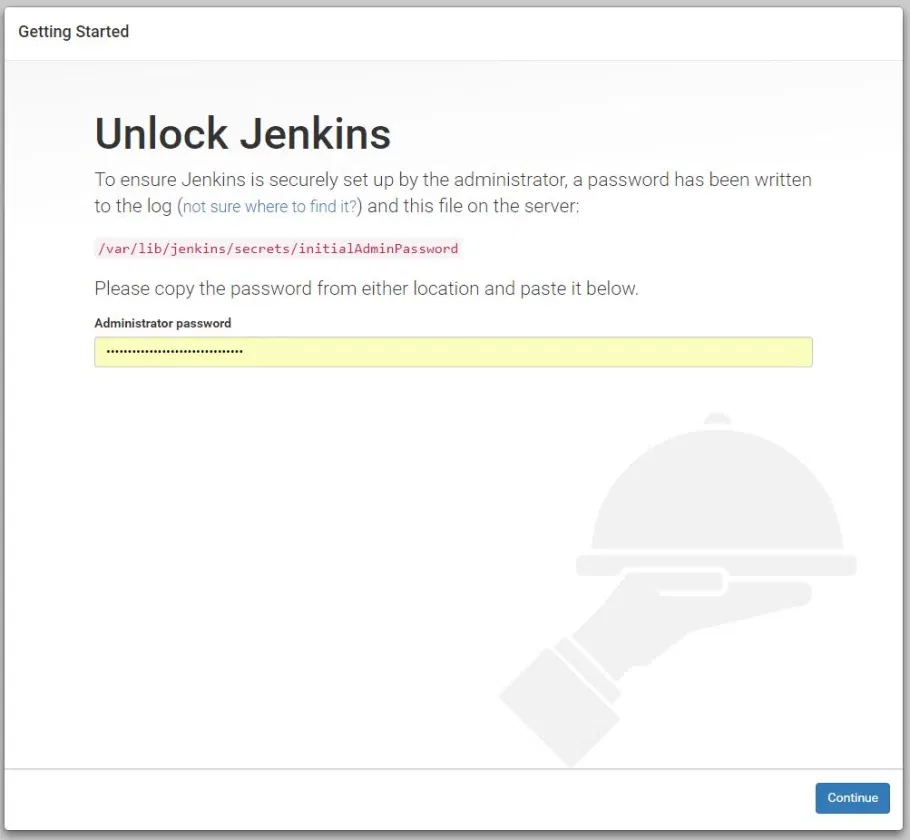
Now proceed with the installation steps mentioned in jenkins installation tutorial in the Devops Section (https://staging.proskillshub.com//learn-devops/what-is-jenkins/ )