Angular HTTP
Angular HTTP is a HTTP client module, used to get and post data. It is used to perform http service. To use this service, we need to import http module in app.module.ts..
app.module.ts
import { BrowserModule } from '@angular/platform-browser';
import { NgModule } from '@angular/core';

import { AppRoutingModule } from './app-routing.module';
import { AppComponent } from './app.component';
import { MyfirstcomponentComponent } from './myfirstcomponent/myfirstcomponent.component';
import { CustomDirective } from './custom.directive';
import { SquarePipe } from './square.pipe';
import { HomeComponent } from './home/home.component';
import { ContactComponent } from './contact/contact.component';
import {CommonService } from './common.service';
import { HttpClientModule } from '@angular/common/http';

@NgModule({
  declarations: [
    AppComponent,
    MyfirstcomponentComponent,
    CustomDirective,
    SquarePipe,
    HomeComponent,
    ContactComponent
  ],
  imports: [
    BrowserModule,
    AppRoutingModule,
    HttpClientModule
  ],
  providers: [CommonService],
  bootstrap: [AppComponent]
})
export class AppModule { }
Lets use this url “http://jsonplaceholder.typicode.com/users” to fetch some sample data and display the same.
Lets create a getData() method inside common.service.ts, so that it can be used anywhere inside the project.
Common.service.ts
import { Injectable } from '@angular/core';
import { HttpClient } from '@angular/common/http';

@Injectable({
  providedIn: 'root'
})
export class CommonService {
  private url = "http://jsonplaceholder.typicode.com/users";
  constructor(private http: HttpClient) { }
  showDate(){
    let dt = new Date;
    return dt;
  }

  getData(){
    return this.http.get(this.url);
  }
}
Lets utilize this getData in the home component and display the output.
Home.component.ts
import { Component, OnInit } from '@angular/core';
import {CommonService} from '../common.service';
@Component({
  selector: 'app-home',
  templateUrl: './home.component.html',
  styleUrls: ['./home.component.css']
})
export class HomeComponent implements OnInit {

  constructor(private cs : CommonService) { }
  showdate: any;
  public users: any;
  ngOnInit(): void {
   // this.showdate = this.cs.showDate()
    this.cs.getData().subscribe((data : any) => {
      this.users = Array.from(Object.keys(data), k=>data[k]);
   });
  }
}
We can see from above, getData() is called and observable type data is returned. The subscribe method is used on it to get the data we need.
Home.component.html
<p>home works!</p>
<h1>
<h3>Users Data</h3>
<ul>
  <li *ngFor="let item of users; let i = index">
      {{item.name}}
   </li>
</ul>
</h1>
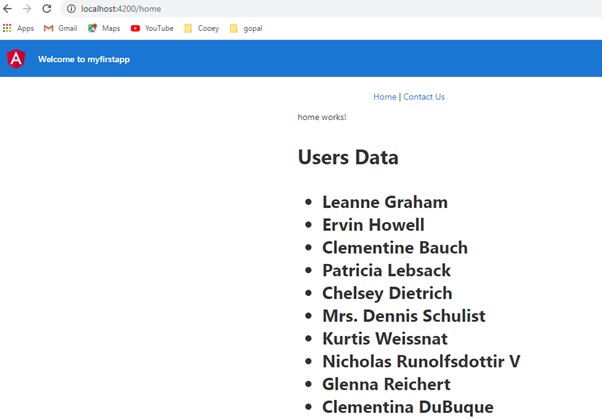
We use *ngIf to loop thru the array of objects and display the name.
Below screenshot shows the output on the browser.